
As a designer, I worked on UX alignment of Azure Cognitive Services which is a suite of cloud-based APIs from Microsoft that enables developers to easily integrate AI capabilities—like vision, speech, language, and decision-making into their apps.
Situation – 6+ : 26
Azure Cognitive Services is a suite of cloud-based APIs from Microsoft that enables developers to integrate AI capabilities—like vision, speech, language, and decision-making—into their applications.
With 26 Cognitive Services products built by separate teams and acquired companies, users faced inconsistent UX patterns, navigation, and workflows across 6+ siloed design systems. This fragmentation created:
- User confusion and friction for developers integrating multiple services
- Diminished trust in the platform’s reliability and cohesiveness
- Difficult cross-service learning as patterns varied wildly between products
- Negative customer perception impacting adoption rates
- Inefficient engineering with duplicated effort across teams
- Poor discoverability: Azure portal was only the 5th highest traffic referrer, signaling navigation and wayfinding issues
With millions in revenue across these 26 products, the business risk of continued fragmentation was significant.

Task
The project’s primary motivation was to address the fragmentation undermining Azure Cognitive Services’ customer experience. Business leaders sought a consistent, trustworthy brand image that would foster developer loyalty and increase adoption rates. User research highlighted the need for smoother transitions and recognizable UX patterns across services. Aligning the UX would also drive engineering efficiencies and reduce support burdens. Ultimately, we aimed to create a unified product suite that empowers developers while elevating Microsoft’s reputation in the AI platform space.
GOAL 1
Achieve a consistent UX across all Cognitive Services tools by standardizing design systems and workflows.
GOAL 2
Improve customer trust and perception by presenting a cohesive suite identity and smoother adoption journey.
GOAL 3
Enable greater engineering efficiency by aligning teams on a unified UX approach.
ROLE
Lead UX Designer
TOOLS
Figma, Powerpoint, Microsoft Design System
TEAM
Designers, Engineers, Product Managers, Brand Team
TIMELINE
3 years (2021-2024)
Action 1 – Research: Mapping the fragmentation. Conducted comprehensive audit of existing landscape.
The fragmentation was deeper than surface-level visual inconsistencies—it reflected fundamentally different information architectures and mental models across teams.


Action 2 – Envisioning: Exploring a unified user journey
Created low-fidelity user journey flows exploring how Decision, Vision, Speech, and Language services could converge into a single AI Studio.


Action 3: Building the business case – Developed formal presentation and proposal for positioning and restructuring Cognitive Services offerings.


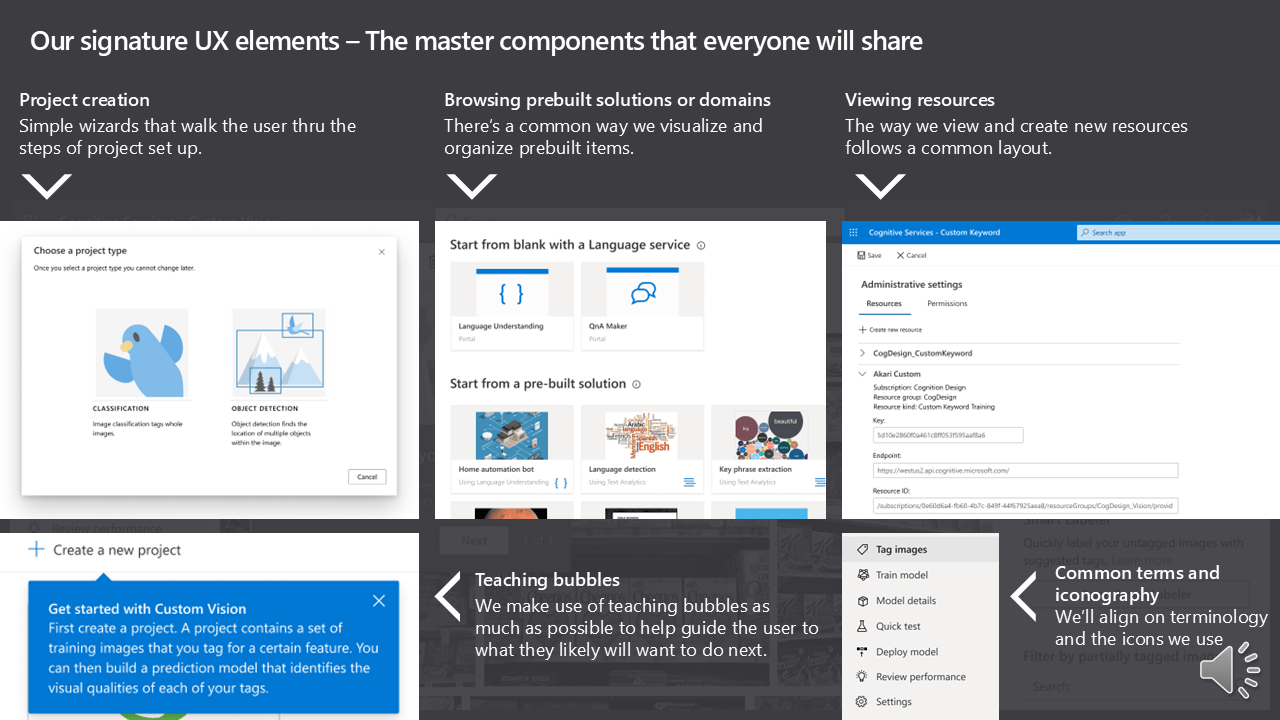
Action 4: Defining the signature UX elements and common system
Creating the components that will bring consistency and visual alignment across Cognitive Services
Deliverables: Common navigation patterns, Standardized page templates, Unified visual language, Reusable component library and Interaction patterns for core workflows.

Action 5 – Phased Rollout Strategy: Crawl-Walk-Run Implementation
Recognizing we couldn’t rebuild everything at once, we created a pragmatic implementation strategy:
CRAWL: Quick wins—standardize navigation and page titles across existing sites
WALK: Adopt common components for new features and major updates
RUN: Full migration to unified AI Studio

Early exploration of unified AI Studio


Concept study – How do users perceive the information hierarchy in the AI Studio?
Is the AI Hub design is going in the right direction? What sections should we add or remove? Is the landing page helpful? How can we cater to new users and returning users?


Video of usability prototype
Action 6 – Scaling thru design systems: Formalizing and evangelizing our common UX patterns with a Figma toolkit
Multiple teams adopted the toolkit, creating organic momentum for consistent implementation without top-down enforcement.


Result – Successfully unified 26 fragmented products across 6+ design systems into a cohesive platform experience.
I championed a system-level rework of portal websites, driving engineering and design to converge on a single, unified UX standard. Through systematic execution—resolving 68 papercut bugs, establishing common navigation patterns, and creating self-service design toolkits—we transformed Azure portal from the 5th to the 2nd highest traffic referrer, directly demonstrating improved discoverability and user confidence.
The phased “Crawl-Walk-Run” approach maintained business continuity for a $1B+ revenue stream while multiple teams organically adopted the new patterns through enablement rather than mandate. We translated the alignment into tangible customer benefits—greater efficiency, easier onboarding, and trust in a more cohesive product family. The end result was a seamless, consistent experience that strengthened the Azure brand, reduced support burden, and made the suite significantly easier to adopt and use.

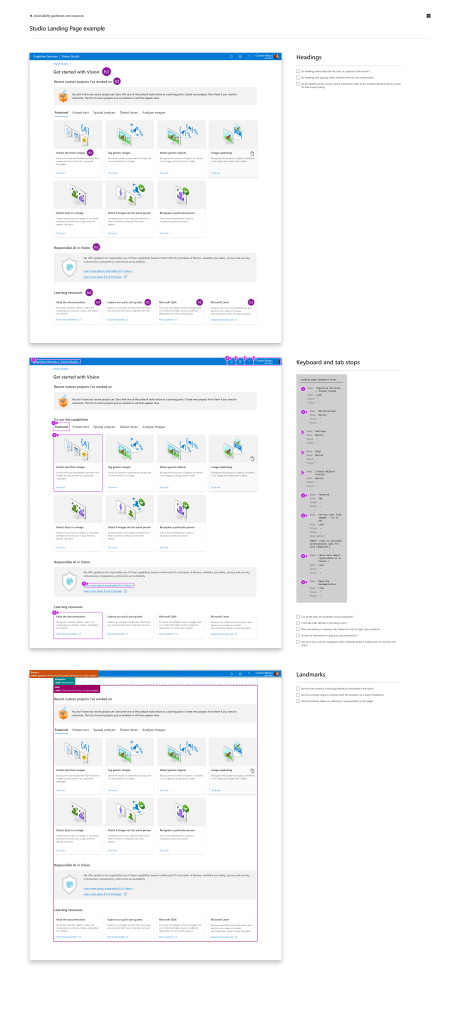
Final common landing page designs that shipped in phases from 2021-2024


